
Sometimes I get data like this…

that needs to be like this…
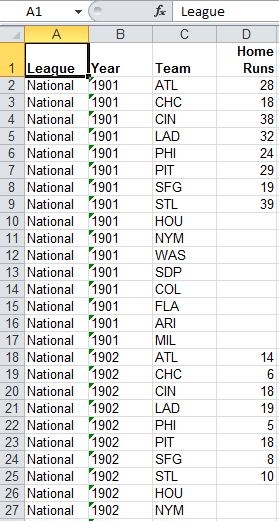
The goal here is to roll up all the home runs into one, much longer, column. The data will then be pivot-worthy.
Generally, I need to keep one or more leftmost column headers, in this case “League” and “Year.” I need a new column to describe the rolled-up category (“Team”) and one for the data itself (“Home Runs”). I’ve written code a couple of times to handle specific cases and thought I’d try to generalize it. Here’s the result:
'List: The range to be normalized.
'RepeatingColsCount: The number of columns, starting with the leftmost,
' whose headings remain the same.
'NormalizedColHeader: The column header for the rolled-up category.
'DataColHeader: The column header for the normalized data.
'NewWorkbook: Put the sheet with the data in a new workbook?
'
'NOTE: The data must be in a contiguous range and the
'rows that will be repeated must be to the left,
'with the rows to be normalized to the right.
Sub NormalizeList(List As Excel.Range, RepeatingColsCount As Long, _
NormalizedColHeader As String, DataColHeader As String, _
Optional NewWorkbook As Boolean = False)
Dim FirstNormalizingCol As Long, NormalizingColsCount As Long
Dim ColsToRepeat As Excel.Range, ColsToNormalize As Excel.Range
Dim NormalizedRowsCount As Long
Dim RepeatingList() As String
Dim NormalizedList() As Variant
Dim ListIndex As Long, i As Long, j As Long
Dim wbSource As Excel.Workbook, wbTarget As Excel.Workbook
Dim wsTarget As Excel.Worksheet
With List
'If the normalized list won't fit, you must quit.
If .Rows.Count * (.Columns.Count - RepeatingColsCount) > .Parent.Rows.Count Then
MsgBox "The normalized list will be too many rows.", _
vbExclamation + vbOKOnly, "Sorry"
Exit Sub
End If
'You have the range to be normalized and the count of leftmost rows to be repeated.
'This section uses those arguments to set the two ranges to parse
'and the two corresponding arrays to fill
FirstNormalizingCol = RepeatingColsCount + 1
NormalizingColsCount = .Columns.Count - RepeatingColsCount
Set ColsToRepeat = .Cells(1).Resize(.Rows.Count, RepeatingColsCount)
Set ColsToNormalize = .Cells(1, FirstNormalizingCol).Resize(.Rows.Count, NormalizingColsCount)
NormalizedRowsCount = ColsToNormalize.Columns.Count * .Rows.Count
ReDim RepeatingList(1 To NormalizedRowsCount, 1 To RepeatingColsCount)
ReDim NormalizedList(1 To NormalizedRowsCount, 1 To 2)
End With
'Fill in every i elements of the repeating array with the repeating row labels.
For i = 1 To NormalizedRowsCount Step NormalizingColsCount
ListIndex = ListIndex + 1
For j = 1 To RepeatingColsCount
RepeatingList(i, j) = List.Cells(ListIndex, j).Value2
Next j
Next i
'We stepped over most rows above, so fill in other repeating array elements.
For i = 1 To NormalizedRowsCount
For j = 1 To RepeatingColsCount
If RepeatingList(i, j) = "" Then
RepeatingList(i, j) = RepeatingList(i - 1, j)
End If
Next j
Next i
'Fill in each element of the first dimension of the normalizing array
'with the former column header (which is now another row label) and the data.
With ColsToNormalize
For i = 1 To .Rows.Count
For j = 1 To .Columns.Count
NormalizedList(((i - 1) * NormalizingColsCount) + j, 1) = .Cells(1, j)
NormalizedList(((i - 1) * NormalizingColsCount) + j, 2) = .Cells(i, j)
Next j
Next i
End With
'Put the normal data in the same workbook, or a new one.
If NewWorkbook Then
Set wbTarget = Workbooks.Add
Set wsTarget = wbTarget.Worksheets(1)
Else
Set wbSource = List.Parent.Parent
With wbSource.Worksheets
Set wsTarget = .Add(after:=.Item(.Count))
End With
End If
With wsTarget
'Put the data from the two arrays in the new worksheet.
.Range("A1").Resize(NormalizedRowsCount, RepeatingColsCount) = RepeatingList
.Cells(1, FirstNormalizingCol).Resize(NormalizedRowsCount, 2) = NormalizedList
'At this point there will be repeated header rows, so delete all but one.
.Range("1:" & NormalizingColsCount - 1).EntireRow.Delete
'Add the headers for the new label column and the data column.
.Cells(1, FirstNormalizingCol).Value = NormalizedColHeader
.Cells(1, FirstNormalizingCol + 1).Value = DataColHeader
End With
End Sub
You’d call it like this:
NormalizeList ActiveSheet.UsedRange, 2, "Team", "Home Runs", False
End Sub
It runs pretty fast. The sample sheet above – 109 years of data by 16 teams – completes instantly. 3,000 rows completes in a couple of seconds.
If I also run the routine on some American League data and put all the new rows in one sheet (with the same column headers) I can generate a pivot table that looks like this, which I couldn’t have done with the original data:
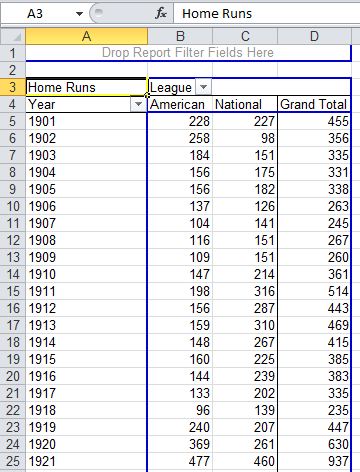
You can download a zip file with a .xls workbook that contains the data and code. Just click on the “normalize” button.
Thank you for posting this. I am new(er) at vba and recently had to make something similar for a breakout I get each month at work. While my code works, it has to be tweaked if there are any changes in the # of columns and rows in the breakout.
Looking forward to utilizing this code!
I spent some time trying to make this work, but I can’t seem to figure out how the code should be tweaked if I had five columns on the left instead of two. (i.e., if in your sample spreadsheet you had three additional columns after League and Year that you do not want normalized).
Does that make sense? If not let me know. If it does and there is an easy fix, can you tell me what would need to be changed to accommodate this type of breakout?
Thanks.
David, you just need to change the “2” in the second argument to a “5,” in the sample calling code above. That tells it there are five columns on the left that stay the same:
Let me know if that works for you.
I was hoping it was something simple, that worked.
Thanks again!
David, I’m glad that did it. Thanks for the comments and clarifying question.
Pingback: Data Normalizer – the SQL - yoursumbuddy
Doug,
thanks for this beautifull piece of code.
it saves a lot of time for my team.
Thanks Elkay. I’ve written an interface for it that works nicely. I’m going to work on it a little more and then post it here.
Thanks Doug – this is BRILLIANT code.
I wish you much happiness for providing this code, as it has now become a great time-saver for me.
Thanks.
Dom
Doug
that’s really great, is it possible to do the same without VBA ( not an option for me), i mean using only excel formula.
regards
mimoune
Thanks! I would ask your question, with specifics and pictures, at SuperUser or another online forum.
HI Doug – came upon your macro and its really elegant. I have a slight more tricky dataset that I am trying to normalize and I think your macro can provide a good foundation to do that but I am no good in VBA. Wondering if you have any pointers on how to mod. Here is my basic goal:
I have a dataset in excel that looks like this:
Date Country1-GDP Country2-GDP Country1-Unemp Country2-Unemp
and I would like to produce a normalized dataset like this:
Date1 Country1_Name Country1-GDP Country1-Unemp
Date1 Country2_Name Country2_GDP Country2_Unemp
Date2 Country1_Name Country1-GDP Country1-Unemp
So instead of one dimension column like in your example I have N. This is similar to if your example tracked multiple stats like: home runs, wins, losses for each team in a wide format.
any tips are much appreciated!
Roger, thanks for you comment and question. I see that you found an answer on Stack Overflow.
Doug
This is so helpful – I have been puzzling about a very similar problem for months. This code solves the issue.
Thank you so much!
Bill
Pingback: Daily Dose of Excel » Blog Archive » UnPivot Shootout
This seems exactly what I needed, but I get a VBA error code 400. My only modification to the original code was to change the 2 to a 7
Sub TestIt()
NormalizeList ActiveSheet.UsedRange, 7, “FiscalDate”, “Amount”, False
End Sub
I’m sorry, I can’t tell why that would be. I’m a big fan of Stack Overflow as a place to solve problems with code, so I encourage you to ask there. Be sure to describe your data setup. Good luck.
Thanks Brilliant, quickest and most useful unpivot code!
THANK YOU this code is great – worked for me right the first time. AWESOME!
Thanks for this, it’s a great piece of code.
If I don’t want any repeating columns, can I comment the repeating columns lines and still get accurate data?
Also, is there a way to avoid rewriting lines that have a null value?
Thanks Anna. The first one is an interesting question. It would have been nice to write it with the possibility of no repeating columns. The logic is intertwined though, and it would take more that just commenting out parts. One possible quick fix is to insert a “dummy” repeating column, run the routine and then delete the left-most column. If your using this as part of a larger automation that might be messy (but doable). If your just running the process by itself, this might be a usable solution.
I’m not sure I understand your second question. If you’re just wanting to delete resulting empty rows though, a sorting might be the easiest solution. If it needs to be coded, Stack Overflow has quite a bit of good answers about deleting blank rows. Look for one that uses SpecialCells(xlCellTypeBlank).
Hoping to use this as a foundation, my data is rather complex in that on the right I have repeatitive columns (13) x 100 so I need each sequence of 13 columns in a different row, can you please help new to vba but can easily grasp ..thanks
Hi Jeff. It sounds like this might work for you as is. It’s a little hard to tell from the brief description.
At any rate, I’d try asking on a forum like Stack Overflow. If you ask a detailed question and show some code you’ll get a good answer. Good luck!
Hey, pretty sure this would work for me, is it possible for me to send you my file as well as the normalized output that I manually generated by copy and paste? you could just help out with hints on what to adjust.
Jeff, sorry I just don’t have time to do that. Again, I’d try Stack Overflow. You can refer to this question: http://stackoverflow.com/questions/10921791/melt-reshape-in-excel-using-vba, where I posted all the code from this post. Show your before and after, and hopefully make an attempt at the VBA, and somebody will help you.
That’s a lot of code for a simple task.
Consider to use:
Sub M_snb()

  With HR_NL.Cells(1).CurrentRegion

    sn = .Resize(, .Columns.Count + 1)

  End With
For j = 3 To UBound(sn, 2) - 1
With Sheet2.Cells(2 + (UBound(sn) - 1) * (j - 3), 1)
.Resize(UBound(sn) - 1, 4) = Application.Index(sn, Evaluate("row(2:" & UBound(sn) & ")"), Array(1, 2, UBound(sn, 2), j))
.Resize(UBound(sn) - 1, 1).Offset(, 2) = sn(1, j)
End With
Next
End Sub
Thanks for dropping by SNB! Very nice.
Hello Doug,
I’m trying to apply your code to an xslm file. When I copy the sample file, the normalization macro works. But starting from a fresh sheet and binding the TestIt() (Arrays) macro to a new button, I get a ‘Subscript out of range Error 9’ error, with the debugger pointing to
For i = 1 To NormalizedRowsCount
For j = 1 To RepeatingColsCount
If RepeatingList(i, j) = "" Then
RepeatingList(i, j) = RepeatingList(i - 1, j) <-- this line
End If
Next j
Next i
Do you know what’s happening here? I know almost nothing about VBA at the moment, but I’m learning. Thanks!
-D
I’m sorry, Didier, but I don’t know what that would be. I suggest starting out with a really simple data set and working up from that. If you need help, consider asking on Stack Overflow. This code is posted there at http://stackoverflow.com/questions/10921791/melt-reshape-in-excel-using-vba. If you post a question there, you might want to refer to it,or this post, for background.
I’m afraid that’s all I’m able to offer. Good luck!
I love you Doug! I am working Excel data for use in Tableau and I am not allowed to install data reshaping add-ins, so this VBA is a godsend! Thanks again!
Thanks Kurt!
Hi Doug this has potentially saved me a lot of time and I appreciate the work you put into this!
One question, when I use this and I change the number of columns in the second argument, I get only the column headers normalized and repeated for each record, but not the data itself. I there are a lot of empty cells in the array I am trying to normalize but the first column of that array is never empty. Yet the value never appears.
Any thoughts?
Andres, sorry I’m not able to help you. I suggest asking on Stack Overflow or another forum. SO has lots of data normalizing answers already.
Good luck!
Andres – If you’ve posted a question on a forum, can you post the link here? If not, can you send an example of your layout to me, so I can take a look? weir.jeff@gmail.com.
This is awesome! Thank you very much!